Overview
Invoices are automatically generated by our billing system based on the service billing cycle selected during checkout.
All invoices are created in advance to ensure uninterrupted service continuity.
When Are Invoices Generated?
Invoices are generated automatically before the service due date.
The generation timeline depends on the billing configuration of the service, typically:
-
Monthly services – Invoice generated several days before renewal date
-
Quarterly / Semi-Annual / Annual services – Invoice generated in advance of the renewal date
The exact renewal date is based on the original service activation date.
How the Renewal Date Works
Your renewal date remains the same throughout the service lifecycle unless:
-
The service is upgraded or downgraded
-
The billing cycle is changed
-
The service is manually adjusted by our billing team
Payment & Due Date
Each invoice includes:
-
Invoice number
-
Billing period
-
Due date
-
Payment method
-
Total payable amount
To avoid service interruption, payment must be completed before the due date.
What Happens If an Invoice Is Not Paid?
If payment is not received by the due date:
-
A reminder may be sent automatically.
-
The service may be temporarily suspended.
-
Continued non-payment may result in service termination.
Please refer to our Service Suspension Policy for further details.
Invoice Notifications
Invoice notifications are sent to the registered email address associated with your account.
Please ensure your contact email is accurate and up to date.
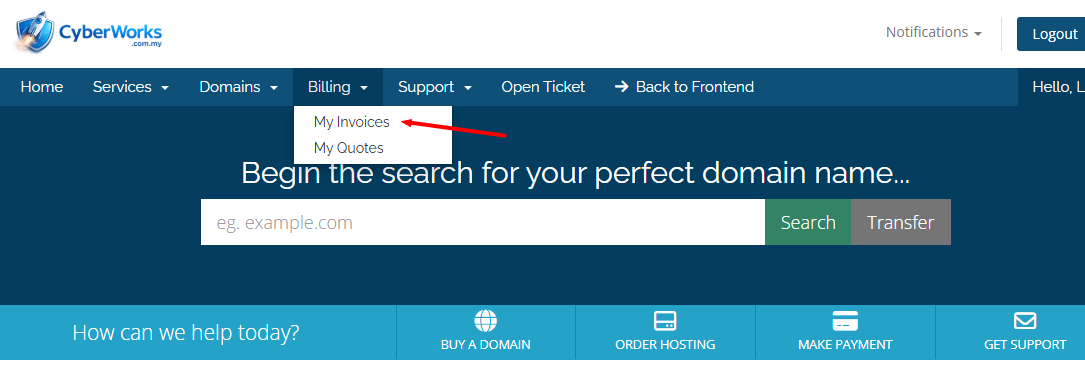
Where Can I View My Invoices?
You can view all invoices inside the Client Area under:
Billing → My Invoices
There you may:
-
Download invoice PDFs
-
Check payment status
-
View transaction history